In a busy OLTP environments, blocking is one of the most common performance challenges. As readers and writers frequently compete for the same data and block each other. For overcoming this, SQL Server introduced Read Committed Snapshot Isolation (RCSI). It can significantly improve concurrency and application responsiveness with minimal code changes. In this article, we will explore how RCSI works, its benefits and limitations, and the key considerations for DBAs before enabling it in production.
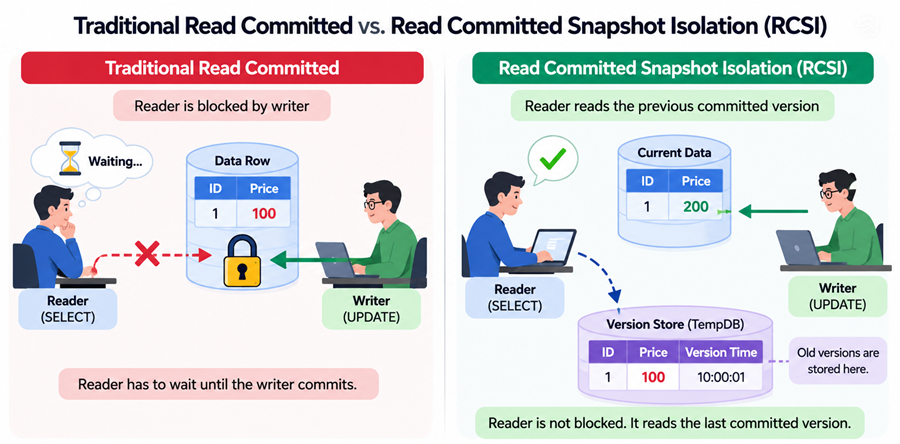
Figure-1: Read Committed Snapshot Isolation
Some fundamental Concepts
Let's check some key concepts.
Read Committed (RC)
Read Committed is the default isolation level in SQL Server. This is also called pessimistic lock. It ensures that a query reads only committed data, meaning it will not see changes made by other transactions until those changes are committed. Under the traditional Read Committed isolation level, SQL Server uses shared locks when reading data. If another transaction is modifying a row and holds an exclusive lock on it, the reader must wait until the transaction commits or rolls back. Similarly, writers may have to wait for readers to release their shared locks. So, reader blocks writer and writer block reader. For example:
- Session 1 starts a transaction and updates a row.
- Session 2 tries to read the same row.
- Session 2 is blocked until Session 1 commits or rolls back.
Characteristics of Read Committed
- Prevents dirty reads (reading uncommitted data).
- Allows non-repeatable reads (the same row may return different values if read twice within a transaction).
- Allows phantom reads (new rows may appear between reads).
- Uses locking by default, which can lead to blocking in high-concurrency environments.
Snapshot Isolation (SI)
This is an optimistic concurrency model in SQL Server that uses row versioning instead of shared locks to provide a consistent view of data throughout an entire transaction. It allows transactions to read previously committed versions of rows without being blocked by concurrent updates.
Snapshot Isolation provides transaction-level consistency. When a transaction begins, SQL Server creates a logical snapshot of the database. Every query within that transaction sees the data exactly as it existed when the transaction started, regardless of any changes committed by other transactions afterward. Previous versions of modified rows are stored in the TempDB version store, allowing readers to access historical data without waiting for locks to be released. Snapshot Isolation allows multiple transactions to modify data concurrently. When there is any update conflicts, one of the transactions is rolled back with an error, and the application must retry the transaction.
Read Committed Snapshot Isolation (RCSI)
Read Committed Snapshot Isolation (RCSI) changes the behavior of the default Read Committed isolation level. Instead of using shared locks to read data, RCSI uses row versioning to provide readers with the last committed version of a row, allowing them to read data without being blocked by concurrent write operations.
When RCSI is enabled, SQL Server stores previous versions of modified rows in the TempDB version store. If a query encounters a row that is currently being modified by another transaction, it reads the most recently committed version from the version store rather than waiting for the transaction to complete. As a result, readers and writers no longer block each other, significantly improving concurrency in OLTP workloads.
Unlike Snapshot Isolation, which provides transaction-level consistency, RCSI provides statement-level consistency. Each statement sees a consistent snapshot of the committed data as it existed at the beginning of that statement, while subsequent statements within the same transaction may see newer committed data.
Implementing Read Committed Snapshot Isolation (RCSI)
You can enable RCSI using Query Snippet-1.
-- Check whether RCSI is enabled
SELECT IS_READ_COMMITTED_SNAPSHOT_ON
FROM SYS.DATABASES
WHERE DATABASE_ID = DB_ID();

-- Enable RCSI
ALTER DATABASE CURRENT
SET READ_COMMITTED_SNAPSHOT ON
WITH ROLLBACK IMMEDIATE;

-- Query Snippet-1
RC Vs. RCSI
First create a table and disable RCSI (if it is already enabled) using Query Snippet-2.
CREATE TABLE [Table1](
	[id] [int] IDENTITY(1,1) NOT NULL,
	[name] [varchar](50) NULL,
 CONSTRAINT [PK_Table1] PRIMARY KEY CLUSTERED
(
	[id] ASC
)
) ON [PRIMARY]
GO
SET IDENTITY_INSERT [dbo].[Table1] ON
GO
INSERT [dbo].[Table1] ([id], [name]) VALUES (1, N'Abdullah')
GO
INSERT [dbo].[Table1] ([id], [name]) VALUES (2, N'Al')
GO
INSERT [dbo].[Table1] ([id], [name]) VALUES (3, N'Mehedi2')
GO
INSERT [dbo].[Table1] ([id], [name]) VALUES (4, N'Hasan')
GO
SET IDENTITY_INSERT [dbo].[Table1] OFF
GO

-- Disable RCSI
ALTER DATABASE CURRENT
SET READ_COMMITTED_SNAPSHOT OFF
WITH ROLLBACK IMMEDIATE;

Query Snippet-2
Now, open two separate sessions in SSMS. In session-1, execute Query Snippet-3 and in Session-2, run Query Snippet-4.
Begin Tran
update [Table1] set [name] = 'Mehedi2'
  where id=3

-- Commit

-- Query Snippet-3
SELECT TOP (1000) [id]
      ,[name]
  FROM [AdventureWorks2022].[dbo].[Table1]
  where id=3

-- Query Snippet-4
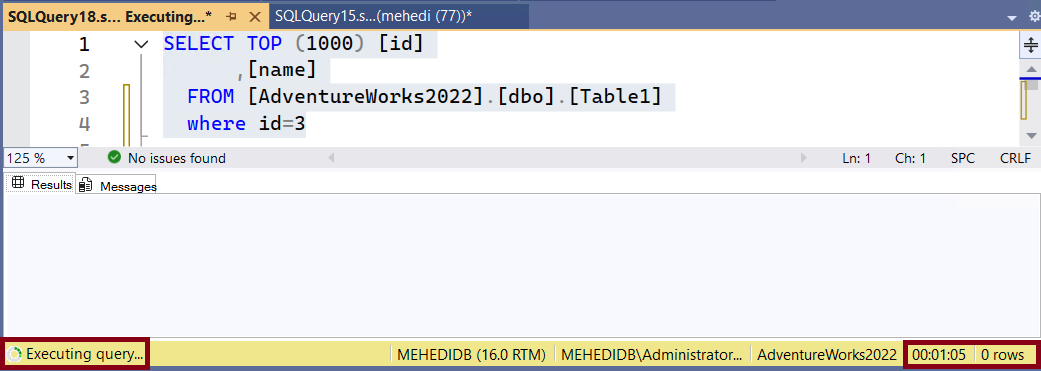
You will see, Session-2 is blocked by Session-1 i.e. writer blocks reader. Once you, execute the Commit command in Session-1, Session-2 will finish instantly.
|
|
 |
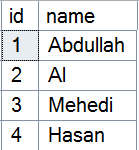
| Figure-2: Table with initial data |
Figure-3: Query blocked due to Read Committed isolation level |
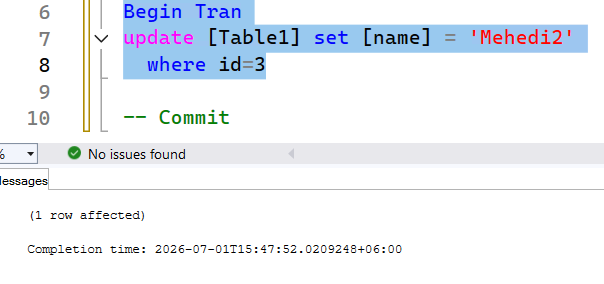
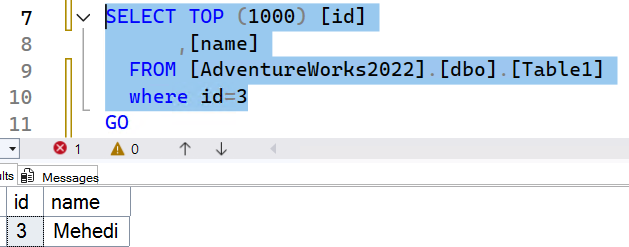
Now, enable the RCSI using Query Snippet-1. Follow above steps again. This time, Session-2 is not blocked. However, it selects old data.
|
|
 |
| Figure-4: Update the table after enabling RCSI |
Figure-5: Query did not block due to enabling RCSI |
SI Vs. RCSI
The key difference between Snapshot isolation and Read Committed Snapshot Isolation is SI supports transaction level isolation i.e. you will get the same data from a SELECT statements throughout the transaction. Where as RCSI supports statement level consistency i.e. within a transaction if you run same SELECT statements multiple times, you may receive the latest data every time.
Snapshot Isolation (Transaction-Level Consistency) Example
On the above table, let's run the Query Snippet-5 to reset the value.
-- Reset the value
UPDATE [Table1] SET [name] = 'Mehedi'
WHERE id=3

Query Snippet-5
Now, in Session-1, run Query Snippet-6.
SET TRANSACTION ISOLATION LEVEL SNAPSHOT;

Begin Tran
UPDATE [Table1] set [name] = 'Mehedi2'
WHERE id=3

-- Commit
-- Snippet-6
In Session-2, execute Query Snippet-7, upto 1st SELECT statement. You will get output as "Mehedi".
SET TRANSACTION ISOLATION LEVEL SNAPSHOT;

Begin Tran

-- 1st SELECT statement
SELECT TOP (1000) [id]
      ,[name]
  FROM [AdventureWorks2022].[dbo].[Table1]
  where id=3

-- 2nd SELECT statement
SELECT TOP (1000) [id]
      ,[name]
  FROM [AdventureWorks2022].[dbo].[Table1]
  where id=3

-- Commit
-- Query Snippet-7
Now, in Session-1, execute the "Commit". If you execute only the 2nd SELECT statement of Session-2, you will still get the old value "Mehedi". Though Session-1 commits the transaction, you still get the old value "Mehedi" as Snapshot isolation supports transaction level data consistency. If you commit the Session-2 and re-execute the SELECT statement, this time it will show you updated data "Mehedi2".
Read Committed Snapshot Isolation (Statement-Level Consistency) Example
Run the Query Snippet-5 to reset the value. In Session-1, run Query Snippet-8.
SET TRANSACTION ISOLATION LEVEL READ COMMITTED;

Begin Tran
UPDATE [Table1] set [name] = 'Mehedi2'
WHERE id=3

-- Commit
-- Snippet-8
In Session-2, execute Query Snippet-9, upto 1st SELECT statement. You will get the value "Mehedi".
SET TRANSACTION ISOLATION LEVEL READ COMMITTED;

Begin Tran

-- 1st SELECT statement
SELECT TOP (1000) [id]
      ,[name]
  FROM [AdventureWorks2022].[dbo].[Table1]
  where id=3

-- 2nd SELECT statement
SELECT TOP (1000) [id]
      ,[name]
  FROM [AdventureWorks2022].[dbo].[Table1]
  where id=3

-- Commit
-- Query Snippet-9
Now, in Session-1, execute the "Commit". If you execute only the 2nd SELECT statement of Session-2, you will still get the updated value "Mehedi2". In same transaction, for different SELECT statements, you will get the different value.
Cautions before Implementing RCSI
RCSI can give performance boosting by removing readers-writers block. However, before implementing in production, consider:
- Test application fully before enabling RCSI. Because, if applications are not designed considering optimistic concurrency, may behave differently and could return unexpected results.
- RCSI increases TempDB activity and needs additional storage. Ensure that TempDB has sufficient capacity.
- Old row versions cannot be removed until long-running transactions are completed. It increases significant TempDB space consumption and potentially affecting performance. Monitor long-running transactions and version store growth.
- Remember that RCSI eliminates reader-writer blocking, not writer-writer blocking.
- Analyze locking hints in your query and take corrective measures before enabling RCSI. For example, if there is any NOLOCK hint, it will continue to perform dirty reads instead of using row versioning.
- Plan the database change during a maintenance window.
Final Words
Read Committed Snapshot Isolation (RCSI) is a powerful feature that helps to reduce reader-writer blocking by leveraging row versioning. However, enabling RCSI is not a one-size-fits-all solution. It requires careful evaluation of application behavior, TempDB capacity, and workload characteristics. By understanding how RCSI differs from traditional Read Committed and Snapshot Isolation, you can make informed decisions that improve concurrency while maintaining the desired level of data consistency.
References
Going Further
If SQL Server is your thing and you enjoy learning real-world tips, tricks, and performance hacks—you are going to love my training sessions too!
Need results fast? I am also available for 1-on-1 consultancy to help you troubleshoot and fix your database performance issues.
Let’s make your SQL Server to take your business Challenge!
For any queries, mail to mamehedi.hasan[at]gmail.com.