Have you ever wondered who changed a critical database object, granted unexpected permissions, or accessed sensitive data? In a busy SQL Server environment, keeping track of every important activity can be challenging without proper auditing. SQL Server Audit provides a built-in mechanism to capture and monitor database and server-level activities, helping DBAs maintain accountability and visibility. In this article, we'll explore how SQL Server Audit works, how to configure it, and the best practices for keeping your database activities under control.
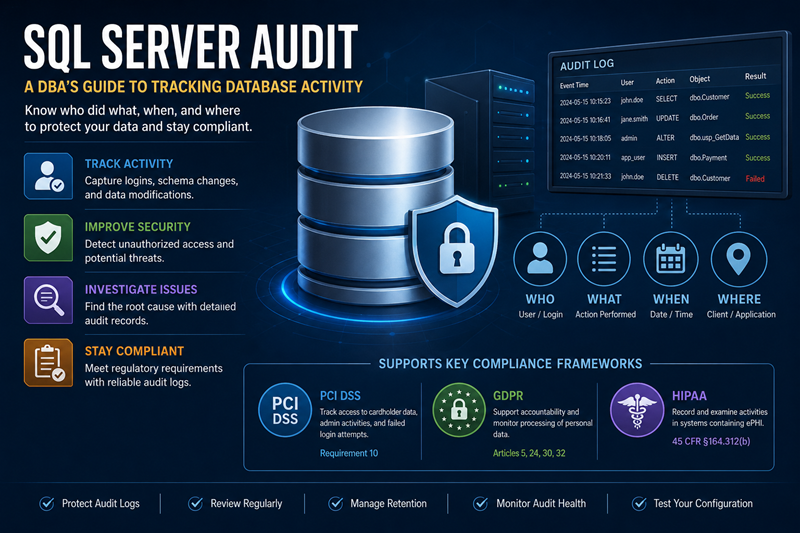
Figure-1: SQL Server Audit
Some Core Components
Let's review some basic components that tailored together to form the SQL Server audit system.
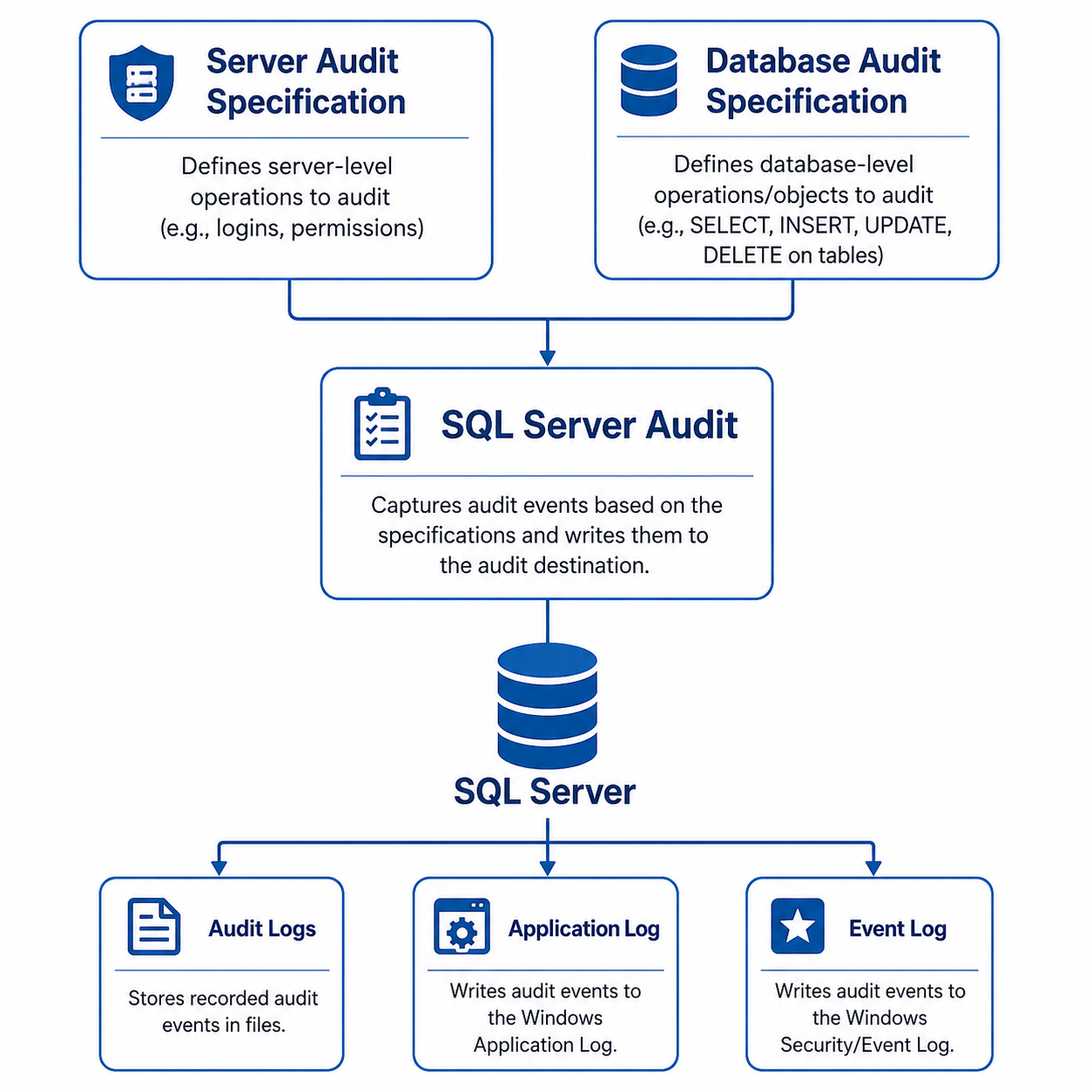
Figure-2: Audit echo-system
SQL Server Audit
It is a built-in security feature based on extended events that tracks and records specific activities performed at the single instance and database levels. It comprises of several components and produces an output called audit. For example, you can configure an audit to record who dropped a table, modified a stored procedure, or changed user permissions, along with when the activity occurred. By default, audit is disabled.
Audit Specification
Audit specification defines which activities SQL Server should monitor and record. It belongs to an audit and there can be one server audit specification per audit. There are:
- Server Audit Specification: Tracks server-level action groups activities, such as login attempts, server permission changes, and login creation.
- Database Audit Specification: Captures database-level actions or action groups, such as table changes (SELECT, INSERT, UPDATE, DELETE), object modifications or schema changes, and database permission changes.
Audit Target
SQL Server audit stores output to a destination file, Windows Application Log, or the Security Log. You should maintain sufficient space for this log.
Auditing The Database
Now, we will capture who login our database and modify the data. You can setup audit from both SSMS and TSQL. We will work through both.
Who logged in the Database
Let's track who, when login the system. Open the Object Explorer from SSMS and navigate to Security > Audit. Right click on it and open the New Audit (Figure-3).
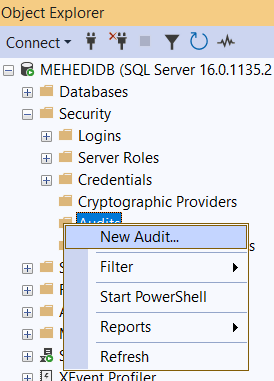
Figure-3: Creating a new Audit
Type a audit name, choose on audit log failure option, select audit destination, here we will write output to file and select the file path (Figure-4) and press OK.
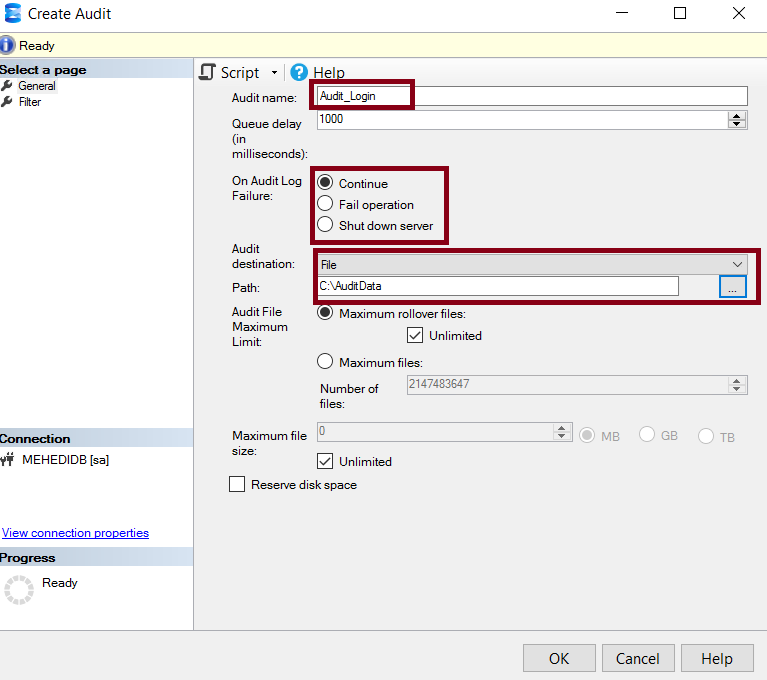
Figure-4: Creating a new Audit
Now, right click on Server Audit Specifications, type a name, select the associated Audit name from drop down list, select FAILED_LOGIN_GROUP & SUCCESSFUL_LOGIN_GROUP from the list (Figure-4). Finally, press OK.
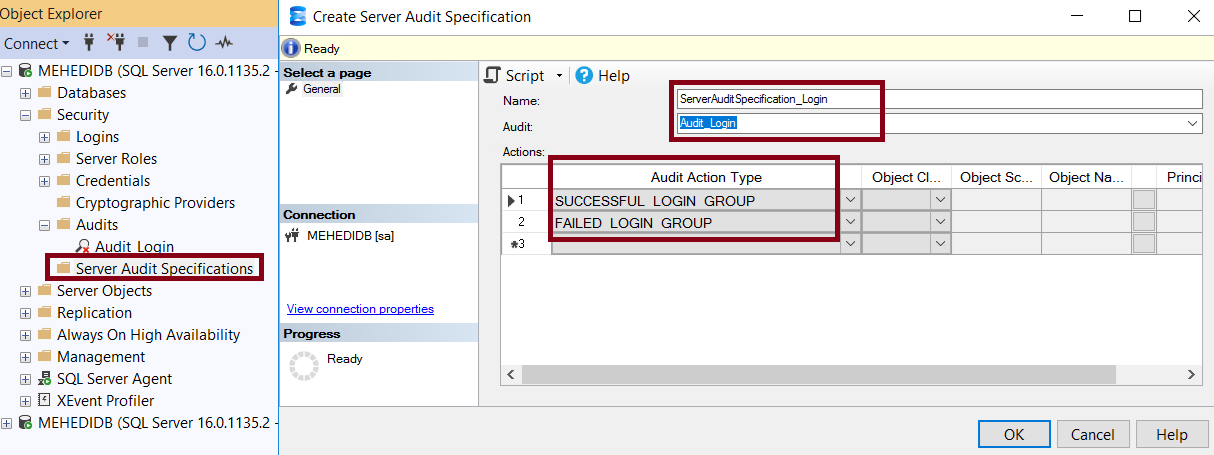
Figure-5: Creating a new Server Audit Specification
Enable the both Audit_login and ServerAuditSpecification_Login.
Analyze the Audit Log
Try to login the database with different username and give wrong password intentionally. Execute Query Snippet-1 in SSMS.
SELECT
    event_time,
    action_id,
    succeeded,
    server_principal_name,
    database_name,
    schema_name,
    object_name,
    statement,
    client_ip,
    application_name
FROM sys.fn_get_audit_file
(
    'C:\AuditData\*.sqlaudit',
    DEFAULT,
    DEFAULT
)
ORDER BY event_time DESC;

-- Query Snippet-1
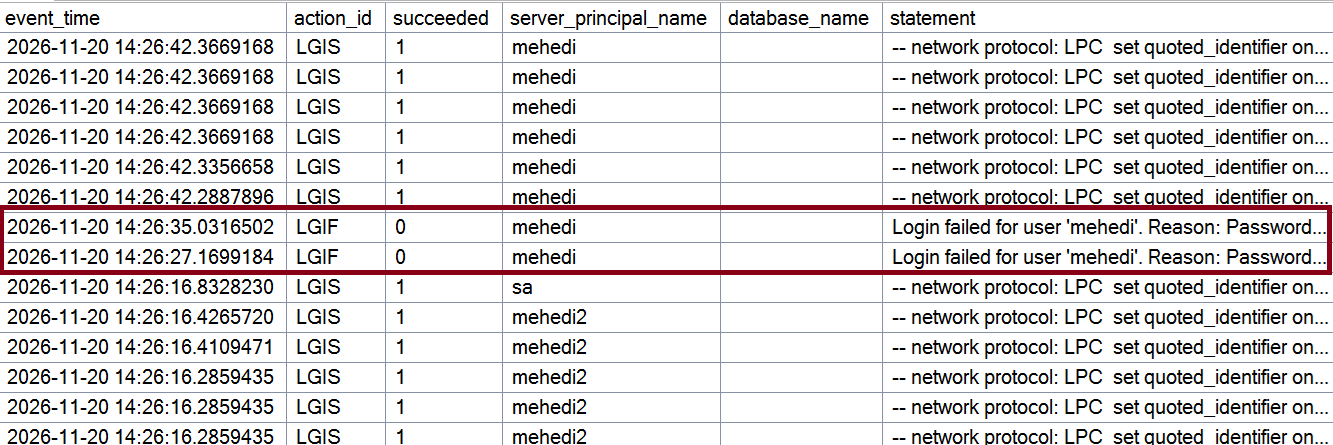
Figure-6: Analyzing Login Audit Log
Who Modified the Data
Let's put another audit to capture who changed data in the [Person].[Person] table. This time, we will use TSQL. Let's create and enable an audit Audit_DataModification_Person using Query Snippet-2.
USE master;
GO

CREATE SERVER AUDIT [Audit_DataModification_Person]
TO FILE
(
    FILEPATH = 'C:\SQLAudit\',
    MAXSIZE = 100 MB,
    MAX_ROLLOVER_FILES = 20,
    RESERVE_DISK_SPACE = OFF
)
WITH
(
    QUEUE_DELAY = 1000,
    ON_FAILURE = CONTINUE
);
GO

-- Enable the Server Audit
ALTER SERVER AUDIT [Audit_DataModification_Person]
WITH (STATE = ON);
GO

USE [AdventureWorks2022]
GO

-- Query Snippet-2
Create a server audit on table Person.Person of AdventureWorks2022 database to monitor any data addition or modification operation using Query Snippet-3.
USE [AdventureWorks2022]
GO

CREATE DATABASE AUDIT SPECIFICATION
    [Server_Audit_Spec_DataModification_Person]
FOR SERVER AUDIT [Audit_DataModification_Person]

ADD (INSERT ON [Person].[Person] BY PUBLIC),
ADD (UPDATE ON [Person].[Person] BY PUBLIC),
ADD (DELETE ON [Person].[Person] BY PUBLIC)

WITH (STATE = ON);
GO

-- Query Snippet-3
You can also check its status using Snippet-4.
SELECT
    name,
    is_state_enabled,
    audit_guid
FROM sys.database_audit_specifications;

-- Query Snippet-4
Let's execute Query Snippet-5 for updating Person.Person table.
UPDATE [Person].[Person] SET
Title = 'Mr.'
WHERE BusinessEntityID = 1

-- Query Snippet-5
Analyzing the Modification Log
You can analyze the log using Query Snippet-6 (Figure-7).
SELECT event_time,action_id, database_name,schema_name,object_name, statement
FROM sys.fn_get_audit_file
(
    'C:\SQLAudit\*.sqlaudit',
    DEFAULT,
    DEFAULT
)
ORDER BY event_time DESC;

-- Query Snippet-6

Figure-7: Analyzing Login Audit Log
Best Practices
- Audit What Matters: Focus on critical activities such as login attempts, permission changes, stored procedure modifications, and sensitive data access. Avoid unnecessary auditing as itt has performance overhead.
- Protect Audit Logs: Restrict access to audit files and ensure unauthorized users cannot modify or delete them.
- Monitor Audit Health: Regularly check whether Server Audits and Database Audit Specifications are enabled and capturing events successfully.
- Manage Storage and Retention: Monitor audit file growth, configure rollover limits, and establish a proper log retention and archival policy.
- Choose the Right Failure Policy: Carefully configure ON_FAILURE based on security and business requirements. Understand the operational impact of each option.
Common Compliance Frameworks and concern Audit Logs
- PCI DSS: FAILED_LOGIN_GROUP, SUCCESSFUL_LOGIN_GROUP.
- GDPR: SELECT, UPDATE, DELETE on tables containing personal data (PII).
- HIPAA: INSERT, UPDATE, DELETE on tables containing healthcare related data.
- SOX: SERVER_ROLE_MEMBER_CHANGE_GROUP, DATABASE_ROLE_MEMBER_CHANGE_GROUP
Final Words
SQL Server Audit helps you to track critical database activities and maintain accountability. By properly configuring audits and regularly reviewing logs, you can identify who did what and when. After all, you cannot protect what you cannot monitor.
References
Going Further
If SQL Server is your thing and you enjoy learning real-world tips, tricks, and performance hacks—you are going to love my training sessions too!
Need results fast? I am also available for 1-on-1 consultancy to help you troubleshoot and fix your database performance issues.
Let’s make your SQL Server to take your business Challenge!
For any queries, mail to mamehedi.hasan[at]gmail.com.